





To write a LinkedIn post, pick one idea, put the point in the first two lines, back it with one specific detail from your own work, keep paragraphs to a line or two, and end with a question people can answer. LinkedIn shows only the opening of a long post before "…more", so the first lines decide whether anyone reads the rest.
The short version: one idea per post. Open with the result, the number or the surprise, not the background. Write in short paragraphs with blank lines between them. Add one thing only you could say: a number, a mistake, a step you actually took. Close with a real question. On my own account, a practical how-to with numbers reached 1,354 impressions; a motivational quote reached 221.
How do you write a LinkedIn post, step by step?
- Pick one idea. If you need "and" to describe the post, it is two posts. Write the idea as one sentence before you write anything else.
- Write the opening last. Draft the body first, then find its most specific line (a result, a number, a turn) and move it to the top. That line is your hook.
- Add the proof. One concrete detail from your own work: what you tried, what it cost, what happened. Advice anyone could give gets scrolled past.
- Break it up. One or two sentences per paragraph, a blank line between them. Use a short list when you have steps.
- End with a question. Ask something your readers can answer from their own experience, not "Thoughts?"
- Read it out loud, then post. Cut every sentence that would survive in any other person's post.
What should a LinkedIn post include?
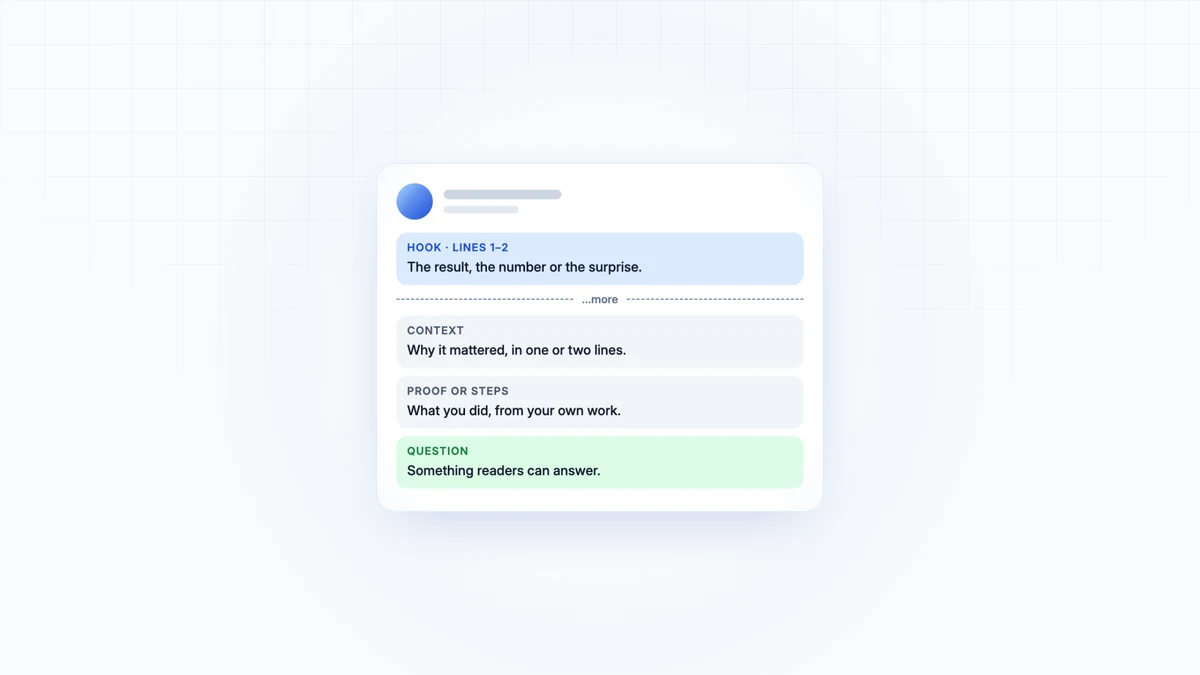
Four parts, in this order. It works as a template you can fill in; the examples are illustrative:
| Part | What it does | Example |
|---|---|---|
| Hook (1–2 lines) | States the result or the surprise before "…more" | "I cut our weekly posting time from three hours to forty minutes." |
| Context (1–2 lines) | Why it mattered | "Posting to four networks every week was eating a whole afternoon." |
| Proof or steps | What you did, specifically | "Three changes: one idea per week, written once and shaped per network; the whole week scheduled on Monday; every post read before it goes out." |
| Question | Invites replies from people who have been there | "Which of the three would you drop first?" |
A worked example: one idea, three drafts
The idea: "Write one post per idea, then shape it for each network."
Draft 1, the version most people post: "In today's world, content creation is more important than ever. Here are some tips for being more efficient with social media." It opens with background, promises "some tips", and contains nothing only its author knows.
Draft 2, specific but buried: the same advice with a real number, but the number sits in paragraph four, below the fold, where most readers never get.
Draft 3, the one to post: the number moves to line one, the steps become a three-item list, and the ending asks which step the reader would drop. Same idea, same facts. Only the order and the specificity changed.
How long should a LinkedIn post be?
As long as the idea needs, up to LinkedIn's limit of 3,000 characters. For most text posts I aim for 120 to 220 words: long enough for one piece of proof, short enough to read without scrolling. What matters most is the opening, because it is all most people see before they decide.
LinkedIn post ideas that are not motivational quotes
LinkedIn's own guide suggests career tips, comments on industry news, professional announcements and behind-the-scenes looks. These are the formats I return to, each built on something you did:
- A measured result: before, after, and what changed in between.
- A mistake: what went wrong, what it cost, what you do now.
- A how-to: the exact steps for one task you do often.
- A tool or template you made: share it whole, not a teaser.
- A disagreement: common advice in your field, and where your experience says otherwise.
- A comment on news: what a change means for people doing your job, in one paragraph.
- A behind-the-scenes look: how a piece of work actually got made, including the messy part.
- A question you are stuck on: people answer real questions.
What has worked on my own LinkedIn account
My numbers are small, so read them as one account's evidence, not a study. A practical how-to with real numbers reached 1,354 impressions. A post with some humour about client pitches reached 1,894. A motivational quote reached 221.
How to format a LinkedIn post
Plain text, short paragraphs, blank lines between them. LinkedIn has no bold button, so bold and italic in posts are Unicode letters; our free LinkedIn text formatter makes them and previews how the post opens in the feed. Use them for a few words at most: screen readers and search treat those letters as different symbols. Use up to three hashtags, if any, and tag people only when they are part of the story.
Write the week in one sitting
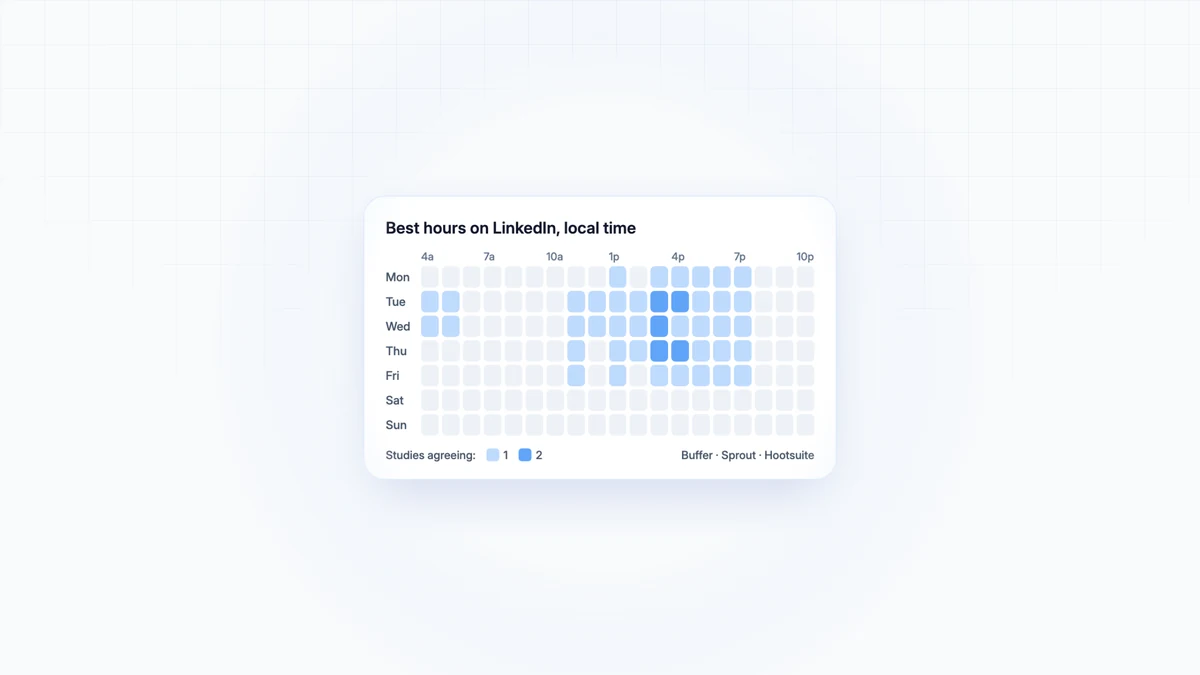
Most people do not run out of ideas; they run out of afternoons. Content batching fixes that: write a week of posts in one session, one idea each, in a voice you have written down, then schedule them for the hours your audience is on LinkedIn and spend the time you saved replying to the comments. That part is where the conversations, and the next post ideas, come from.

Let your agent write the next one in your voice
Skryvo drafts each post in your saved voice and publishes it after your go-ahead. Free to start.